
What is a CSV File - CSV Editing
A CSV file (Comma‑Separated Values) is a plain text file that stores data in a simple table structure.
Each line in a CSV file represents a row, and each row contains fields (or cells) separated by a delimiter, most commonly a comma. The first row often contains column names, although this is optional.
CSV files can be opened by many applications, including text editors, spreadsheet programs, and dedicated CSV editors such as Rons Data Edit, which are designed to handle structured text data reliably.
A Basic CSV Example
FirstName,LastName,Company
Portia,Mcfann,Beachcomber Realty
Andrew,Fenstermacher,Shafer Commercial Seating Inc
Brady,Tatum,Cywinski Jackson Bohlin
Gracie,Riskalla,Richard A Esq Jessup
Helga,Rio,Pony Express
Which represents:
| FirstName | LastName | Company |
|---|---|---|
| Portia | Mcfann | Beachcomber Realty |
| Andrew | Fenstermacher | Shafer Commercial Seating Inc |
| Brady | Tatum | Cywinski Jackson Bohlin |
| Gracie | Riskalla | Richard A Esq Jessup |
| Helga | Rio | Pony Express |
CSV Format Details
A CSV file uses two structural elements:
- Field separator — usually a comma
- Row separator — usually a newline
Because commas and newlines have structural meaning, they must be escaped when they appear inside the data.
1. Fields containing commas
Wrap the field in quotes:
"Cell, with a comma"
2. Fields containing newlines
Also wrapped in quotes:
"Cell with
a new line"
3. Fields containing quotes
Quotes inside a field must be doubled:
"Beverley ""long"""
CSV Cell Format Examples
| Description | Example |
|---|---|
| Normal cell | Cell value |
| Cell containing a comma | "Cell, with a comma" |
| Cell containing a new line |
"Cell with a new line" |
| Cell containing quotes | "Cell with some ""quotes"" in it" |
Complex CSV Example
FirstName,LastName,Company,Address
Claude,Piscitello,"Nippard, Lewis Straughn Pa","127 Maple St
Madison
TN 37115"
"Beverley ""long""",Schilk,"Wahl, Travis J Esq","445 Broadway
Denver
CO 80203"
Maude,Balceiro,"Berger, Leslie M Esq","4933 E Colonial Dr
Orlando
FL 32803"
Roger,Voorheis,Park View Guest House,"204 N Guadalupe St
Santa Fe
NM 87501"
Martina,Rissman,Criterion Electronics Inc,"726 Plymouth Park
Irving
TX 75061"
Which represents:
| FirstName | LastName | Company | Address |
|---|---|---|---|
| Claude | Piscitello | Nippard, Lewis Straughn Pa |
127 Maple St Madison TN 37115 |
| Beverley "long" | Schilk | Wahl, Travis J Esq |
445 Broadway Denver CO 80203 |
| Maude | Balceiro | Berger, Leslie M Esq |
4933 E Colonial Dr Orlando FL 32803 |
| Roger | Voorheis | Park View Guest House |
204 N Guadalupe St Santa Fe NM 87501 |
| Martina | Rissman | Criterion Electronics Inc |
726 Plymouth Park Irving TX 75061 |
CSV Is Not Always About Commas
Although commas are the most common delimiter, CSV‑style files can use many different separators. The name usually changes accordingly:
| Name | Extension | Field Separator | Field Surround |
|---|---|---|---|
| Comma‑Separated Values | .csv | Comma (,) | Quote (") |
| Pipe‑Separated Values | .psv | Pipe (|) | Quote (") |
| Tab‑Separated Values | .tsv | Tab | Quote (") |
In practice, almost any character can be used as a delimiter depending on the software that created the file.
CSV File Encoding
CSV files can be saved using different text encodings, such as:
- UTF‑8 (recommended)
- UTF‑8 with BOM
- ANSI / Windows‑1252
- UTF‑16
Encoding affects how special characters (é, ü, ç, ñ, etc.) are displayed.
Using UTF‑8 ensures the widest compatibility.
Why CSV Files Are Popular
CSV files have been around for decades, yet they remain a standard format for data exchange. Their popularity comes from several advantages:
- Universally supported — almost every software tool can import or export CSV
- Human‑readable — the content is plain text
- Lightweight — no formatting, styling, or metadata
- Easy to generate — any system can create CSV output
- Cross‑platform — works on Windows, macOS, Linux, and cloud systems
- Ideal for data exchange — especially between unrelated systems
Because of these strengths, CSV is used everywhere from spreadsheets to databases to e‑commerce platforms.
Common Uses of CSV Files
CSV files are used in nearly every industry. Typical use cases include:
- Spreadsheet data (Excel, Google Sheets)
- Database exports/imports (MySQL, PostgreSQL, SQL Server)
- E‑commerce product catalogs (Shopify, WooCommerce, Amazon)
- CRM and contact lists
- Financial and accounting data
- Log files and analytics
- Mailing lists and marketing data
- Scientific and statistical datasets
Their simplicity makes them ideal for moving data between systems that do not share a common format.
They are commonly used to transfer data between applications such as spreadsheets, CRMs, databases, e‑commerce platforms, and analytics tools.
Limitations of CSV Files
CSV is simple and flexible, but it has limitations:
- no data types (everything is text)
- no formatting or styling
- no formulas
- no schema or metadata
- no nested structures
- ambiguity with delimiters
- quoting rules can be complex
- large files can be slow in spreadsheet programs
These limitations are why dedicated CSV editors are often preferred for professional work.
How to Open and Edit CSV Files
CSV files can be opened in:
- Text editors (Notepad, VS Code)
- Spreadsheet programs (Excel, Google Sheets)
- Databases
- Dedicated CSV editors such as Rons Data Edit, which handle large files, unusual delimiters, quoting rules, and structured text more reliably than general‑purpose tools.
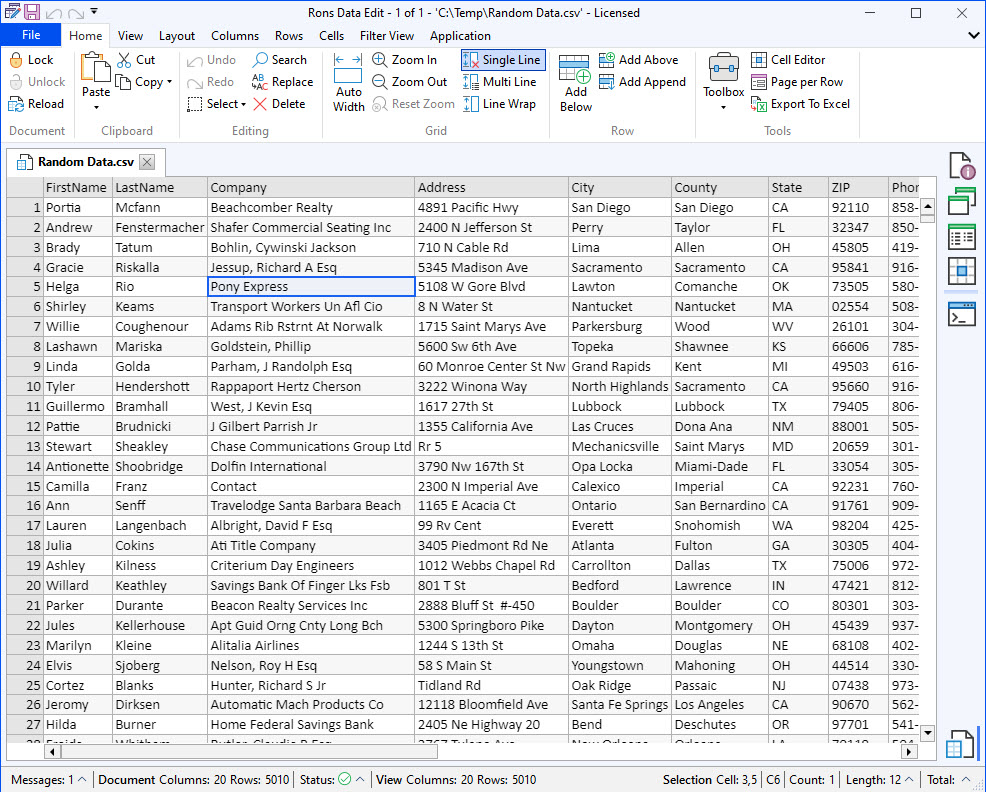
If you need a professional CSV editor and viewer, you can download and install Rons Data Edit (Free lite version available).
FAQ About CSV Files
What does CSV stand for?
CSV stands for Comma‑Separated Values.
Can a CSV file contain line breaks?
Yes, but the field must be wrapped in quotes.
What delimiter does a CSV file use?
Usually a comma, but CSV‑style files may use tabs, pipes, semicolons, or other characters.
What is the difference between CSV and Excel files?
CSV is plain text with no formatting or formulas. Excel files (.xlsx) support formatting, formulas, styles, and metadata.
Can CSV files store special characters?
Yes, but only if the file is saved with a compatible encoding such as UTF‑8.
More Information
Related Information
- A Perfect Excel alternative to handle CSV files
- How to open and view a CSV file
- Rons Data Edit for e-Commerce
- Text Encoding and Languages in CSV Files
- What is a CSV File
- What is the best CSV Editor
- What is the Difference between Rons Data Edit and Rons Data Stream
CSV Editing
Rons Data Edit


